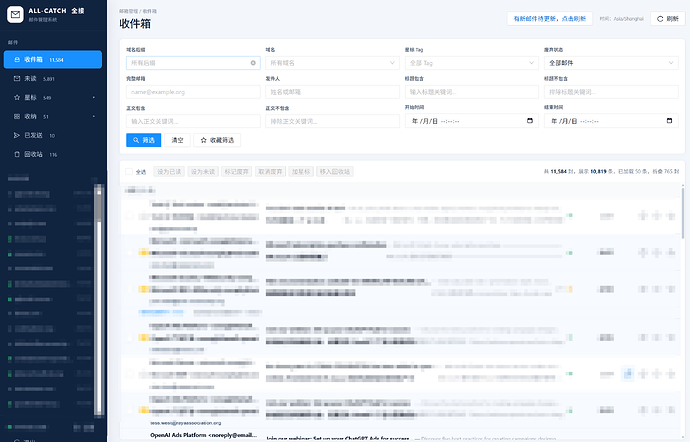
- Zoooooone2026-09-17
一、 系统架构
零服务器成本:纯 Serverless 架构,完全基于 Cloudflare 免费套餐(Email Routing + Worker + D1 数据库),不需要租用任何 VPS。
多渠道自动分流:开启 Catch-all 规则,任意前缀(如 [[email protected]](https://feedbbs.com/cdn-cgi/l/email-protection)、[[email protected]](https://feedbbs.com/cdn-cgi/l/email-protection))随时可用,自动标记渠道。
毫秒级双重响应:
Telegram 手机秒弹:来信 1~2 秒内推送到手机,链接原生高亮可点。(目前测试响应挺快的)
D1 终身归档备份:SQLite 数据库持久化存储,支持 SQL 检索。(CF只有5G的免费空间,有大容量附件的建议设置定时保存,我只是用来接验证码和工作日报完全够用)
专业渲染 HTML 日报与账单:内置 Base64 / Quoted-Printable 深度解码引擎,Python 生成的复杂 HTML 报表、银行对账单在 Web 端原汁原味 1:1 渲染。
密码保护独立面板:绑定自定义二级域名(mail.yourdomain.com),带密码保护的响应式邮箱看板。
二、 前置准备条件
Cloudflare 账号
一个托管在 Cloudflare 上的自定义域名(本教程以 yourdomain.com 为例)。
TG机器人(需要用到bot token和个人id)
在 TG 找 @BotFather 发送 /newbot 获取 TG_BOT_TOKEN。
在 TG 找个可以获取自己的纯数字的机器人即可获取 TG_CHAT_ID。
务必在 TG 找到自己刚建的机器人,点击一次 Start 激活对话。
三、 全流程搭建步骤
1、开启 Cloudflare 邮件路由(Email Routing)
直接把你的域名添加到看板确定就可以了
2、创建 D1 数据库并初始化表结构
点击左侧主菜单 Storage & Databases(存储和数据库) → D1 SQL Database。
点击 Create Database(创建数据库),名称写个自己喜欢的。
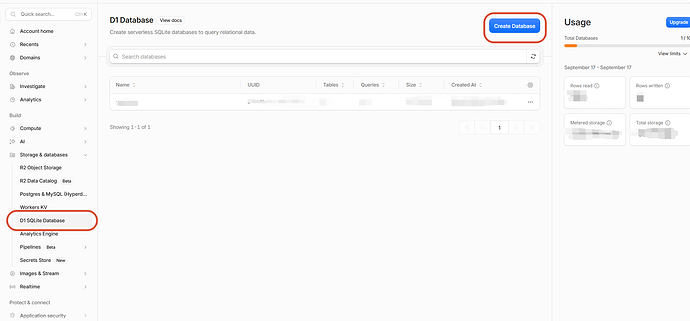
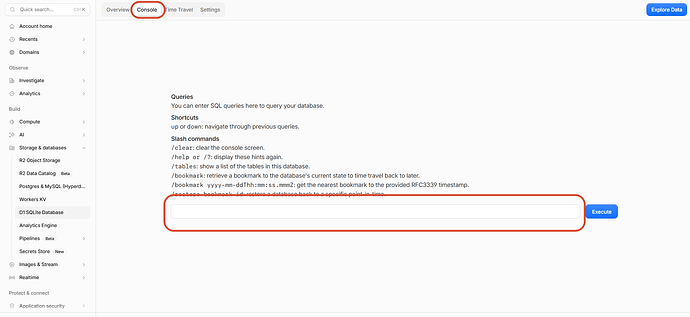
创建完成后,点击进入 mail_db,切换到 Console(控制台) 选项卡。(这里主要是创建收件的表结构,有特殊需求可以自行修改)
粘贴并执行以下建表 SQL:```
CREATE TABLE emails (
id INTEGER PRIMARY KEY AUTOINCREMENT,
message_from TEXT,
message_to TEXT,
subject TEXT,
body_text TEXT,
body_html TEXT,
created_at DATETIME DEFAULT CURRENT_TIMESTAMP
);
```
3、创建一体化 Worker(收信 + 看板 + TG 推送)
- 新建 Worker
访问左侧菜单 Compute → Workers & Pages → 点击 Create → 选择 Worker。
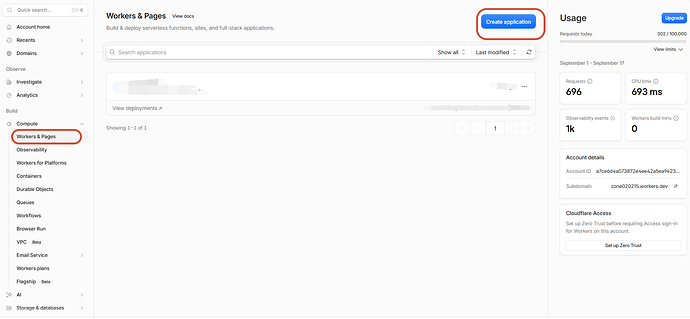
这里我当时是选择了‘Hello World!’这个,如果有大佬开源的Worker用来收邮件也可以去github上找?(我没去找过QAQ)
命名为:mail-receiver(随便起名),点击右下角 Deploy(部署)。
- 贴入完整核心代码
点击右上方的Edit code,清空原有内容,将以下代码粘贴进去:(这里只是给个参考,可以让ai给你一个更适合你个人需求的代码)```
export default {
// ================= 1. 邮件处理核心 (防重试 + 解码 + 入库 + TG) =================
async email(message, env, ctx) {
try {
const fromRaw = message.headers.get('from') || message.from;
const toRaw = message.to;
const subjectRaw = message.headers.get('subject') || '(无主题)';
// 解码中文发件人与标题 (RFC 2047)
const from = decodeHeader(fromRaw);
const subject = decodeHeader(subjectRaw);
const prefix = toRaw.split('@')[0].toUpperCase();
// 解析文本和 HTML 正文 (支持 QP 和 Base64 深度解码)
let cleanText = '';
let cleanHtml = '';
try {
const rawText = await new Response(message.raw).text();
const parsed = parseMime(rawText);
cleanText = parsed.text;
cleanHtml = parsed.html;
} catch (e) {
cleanText = '(正文解析失败)';
}
// 写入 D1 数据库
try {
await env.DB.prepare(
INSERT INTO emails (message_from, message_to, subject, body_text, body_html) VALUES (?, ?, ?, ?, ?)).bind(from, toRaw, subject, cleanText, cleanHtml).run();
} catch (err) {
console.error('写入数据库失败:', err);
}
// 推送到 Telegram (纯文本原生模式:零转义、绝不报错、链接原生高亮可点)
if (env.TG_BOT_TOKEN && env.TG_CHAT_ID) {
const preview = cleanText.slice(0, 800) + (cleanText.length > 800 ? '\n...(内容过长,请到网页端查看完整版)' : '');
const tgText =
🔔 [${prefix} 渠道来信]\n\n+👤 发件人: ${from}\n+📌 主 题: ${subject}\n+📥 收件箱: ${toRaw}\n\n+📝 文本预览:\n${preview};try {
await fetch(
https://api.telegram.org/bot${env.TG_BOT_TOKEN}/sendMessage, {method: 'POST',
headers: { 'Content-Type': 'application/json' },
body: JSON.stringify({
chat_id: env.TG_CHAT_ID,
text: tgText,
disable_web_page_preview: false
})
});
} catch (err) {}
}
} catch (globalErr) {
console.error('邮件处理未知异常:', globalErr);
}
// 关键:明确返回,告知邮件服务器已接收,杜绝 451 循环重发
return;
},
// ================= 2. 网页端服务 (支持密码验证与 HTML 日报沙箱) =================
async fetch(request, env, ctx) {
const url = new URL(request.url);
const cookies = request.headers.get('Cookie') || '';
const isAuthed = cookies.includes(
auth=${env.WEB_PASSWORD});// 处理登录
if (url.pathname === '/login' && request.method === 'POST') {
const formData = await request.formData();
if (formData.get('pwd') === env.WEB_PASSWORD) {
return new Response('', {
status: 302,
headers: {
'Location': '/',
'Set-Cookie':
auth=${env.WEB_PASSWORD}; Path=/; HttpOnly; Max-Age=2592000; SameSite=Lax}
});
}
return new Response('密码错误!<a href="/">返回</a>', { headers: { 'Content-Type': 'text/html;charset=utf-8' } });
}
// 未登录拦截
if (!isAuthed && env.WEB_PASSWORD) {
return new Response(renderLoginPage(), { headers: { 'Content-Type': 'text/html;charset=utf-8' } });
}
// 独立提供 HTML 视窗(供 iframe 沙箱隔离渲染)
if (url.pathname === '/render-html') {
const id = url.searchParams.get('id');
const row = await env.DB.prepare('SELECT body_html, body_text FROM emails WHERE id = ?').bind(id).first();
if (!row) return new Response('未找到该邮件');
return new Response(row.body_html ||
<pre style="padding:20px;white-space:pre-wrap;">${row.body_text}</pre>, {headers: { 'Content-Type': 'text/html;charset=utf-8' }
});
}
// 主邮箱看板
const list = await env.DB.prepare('SELECT id, message_from, message_to, subject, created_at FROM emails ORDER BY id DESC LIMIT 50').all();
const activeId = url.searchParams.get('id') || (list.results[0] ? list.results[0].id : null);
let activeMail = null;
if (activeId) {
activeMail = await env.DB.prepare('SELECT * FROM emails WHERE id = ?').bind(activeId).first();
}
return new Response(renderMailboxPage(list.results, activeMail), {
headers: { 'Content-Type': 'text/html;charset=utf-8' }
});
}
};
// ================= 辅助工具:MIME 解码引擎 =================
function parseMime(raw) {
let text = '';
let html = '';
const boundaryMatch = raw.match(/boundary="?([^";\r\n]+)"?/i);
if (boundaryMatch) {
const boundary = boundaryMatch[1];
const parts = raw.split('--' + boundary);
for (const part of parts) {
if (/content-type:\s*text\/html/i.test(part)) {
html = extractBodyPart(part);
} else if (/content-type:\s*text\/plain/i.test(part)) {
text = extractBodyPart(part);
}
}
} else {
if (/content-type:\s*text\/html/i.test(raw)) {
html = extractBodyPart(raw);
} else {
text = extractBodyPart(raw);
}
}
return { text: text || '(纯 HTML 邮件)', html: html || '' };
}
function extractBodyPart(part) {
const chunks = part.split(/\r?\n\r?\n/);
if (chunks.length < 2) return '';
const header = chunks[0];
let body = chunks.slice(1).join('\n\n').replace(/--$/, '').trim();
// 1. Base64 编码解码
if (/content-transfer-encoding:\s*base64/i.test(header)) {
try {
const bin = atob(body.replace(/\s/g, ''));
const bytes = Uint8Array.from(bin, c => c.charCodeAt(0));
return new TextDecoder('utf-8').decode(bytes);
} catch (e) { return body; }
}
// 2. Quoted-Printable 编码解码(账单、日报、富文本邮件核心)
if (/content-transfer-encoding:\s*quoted-printable/i.test(header) || body.includes('=3D') || /=E[0-9A-F]/i.test(body)) {
try {
let s = body.replace(/=\s*[\r\n]+/g, '');
s = s.replace(/%(?![0-9A-Fa-f]{2})/g, '%25');
s = s.replace(/=([0-9A-Fa-f]{2})/g, '%$1');
return decodeURIComponent(s);
} catch (e) {
return body.replace(/=([0-9A-Fa-f]{2})/g, (_, hex) => String.fromCharCode(parseInt(hex, 16)));
}
}
return body;
}
function decodeHeader(str) {
if (!str) return '';
return str.replace(/=\?([^?]+)\?([BQbq])\?([^?]+)\?=/g, (_, charset, encoding, text) => {
if (encoding.toUpperCase() === 'B') {
try {
const bin = atob(text.replace(/\s/g, ''));
const bytes = Uint8Array.from(bin, c => c.charCodeAt(0));
return new TextDecoder(charset).decode(bytes);
} catch (e) { return text; }
}
return text;
});
}
// ================= 前端模板 =================
function renderLoginPage() {
return
<!DOCTYPE html><html><head><meta charset="utf-8"><meta name="viewport" content="width=device-width,initial-scale=1"><title>邮箱看板登录</title><style>body{background:#f3f4f6;display:flex;align-items:center;justify-content:center;height:100vh;margin:0;font-family:-apple-system,BlinkMacSystemFont,"Segoe UI",Roboto;}form{background:#fff;padding:30px;border-radius:12px;box-shadow:0 4px 6px -1px rgba(0,0,0,.1);width:300px;}h2{margin:0 0 20px;text-align:center;font-size:20px;}input{width:100%;box-sizing:border-box;padding:10px;margin-bottom:15px;border:1px solid #d1d5db;border-radius:6px;}button{width:100%;padding:10px;background:#2563eb;color:#fff;border:none;border-radius:6px;font-weight:bold;cursor:pointer;}</style></head><body><form action="/login" method="POST"><h2>📬 私人邮箱看板</h2><input type="password" name="pwd" placeholder="请输入访问密码" required><button type="submit">解锁并进入</button></form></body></html>;}
function renderMailboxPage(list, mail) {
const mailItems = list.map(item => `
<a href="/?id=${item.id}" style="display:block;padding:14px;border-bottom:1px solid #e5e7eb;text-decoration:none;color:#1f2937;background:${mail && mail.id === item.id ? '#eff6ff' : '#fff'};">
<div style="font-weight:600;font-size:14px;white-space:nowrap;overflow:hidden;text-overflow:ellipsis;">${item.subject || '(无主题)'}</div>
<div style="font-size:12px;color:#6b7280;margin-top:4px;">${item.message_from}</div>
<div style="font-size:11px;color:#9ca3af;margin-top:2px;">渠道: <span style="background:#e5e7eb;padding:2px 4px;border-radius:4px;">${item.message_to.split('@')[0]}</span> · ${item.created_at}</div>
</a>
`).join('');
return `<!DOCTYPE html><html><head><meta charset="utf-8"><meta name="viewport" content="width=device-width,initial-scale=1"><title>云端邮箱控制台</title>
<style>
body{margin:0;font-family:-apple-system,BlinkMacSystemFont,"Segoe UI",Roboto;display:flex;height:100vh;overflow:hidden;background:#f9fafb;}
.sidebar{width:350px;border-right:1px solid #e5e7eb;display:flex;flex-direction:column;background:#fff;}
.sidebar-header{padding:16px;border-bottom:1px solid #e5e7eb;font-weight:bold;font-size:16px;display:flex;justify-content:space-between;align-items:center;}
.mail-list{flex:1;overflow-y:auto;}
.main-view{flex:1;display:flex;flex-direction:column;overflow:hidden;}
.mail-meta{padding:20px;border-bottom:1px solid #e5e7eb;background:#fff;}
.mail-body-container{flex:1;position:relative;background:#fff;}
iframe{width:100%;height:100%;border:none;}
@media(max-width:768px){
body{flex-direction:column;}
.sidebar{width:100%;height:${mail ? '200px' : '100vh'};}
.main-view{height:calc(100vh - 200px);}
}
</style>
</head>
<body>
<div class="sidebar">
<div class="sidebar-header">
<span>📬 邮件归档 (${list.length})</span>
<a href="/" style="font-size:12px;text-decoration:none;color:#2563eb;">刷新</a>
</div>
<div class="mail-list">${mailItems || '<div style="padding:20px;color:#9ca3af;">暂无邮件</div>'}</div>
</div>
<div class="main-view">
${mail ? `
<div class="mail-meta">
<h2 style="margin:0 0 10px;font-size:18px;">${mail.subject}</h2>
<div style="font-size:13px;color:#4b5563;">发件人: <b>${mail.message_from}</b> · 收件箱: <code>${mail.message_to}</code></div>
<div style="font-size:12px;color:#9ca3af;margin-top:4px;">时间: ${mail.created_at}</div>
</div>
<div class="mail-body-container">
<iframe src="/render-html?id=${mail.id}" sandbox="allow-same-origin allow-popups"></iframe>
</div>
` : '<div style="padding:40px;text-align:center;color:#9ca3af;">请选择左侧邮件查看</div>'}
</div>
</body></html>`;
}
```粘贴后点击右上角 Deploy(部署)。- 绑定 D1 数据库与环境变量
进入该 Worker 的 Bindings(绑定) → D1 Database Bindings → Add binding。
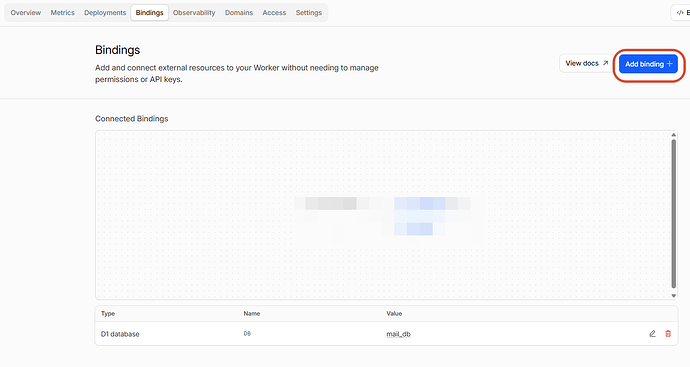
选择的D1 database,添加到Bindings
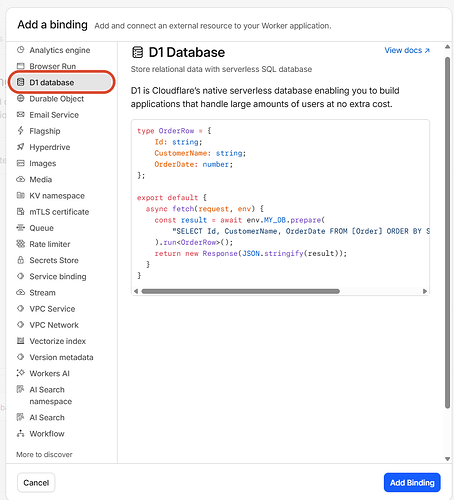
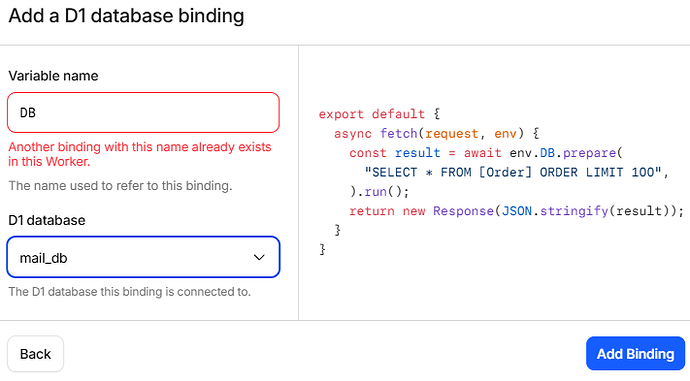
Variable name 填:DB(这个和上面的代码有关系,你代码怎么写的,这里就怎么填,依旧不懂问ai嘻嘻)。
数据库选中:mail_db,保存并部署。
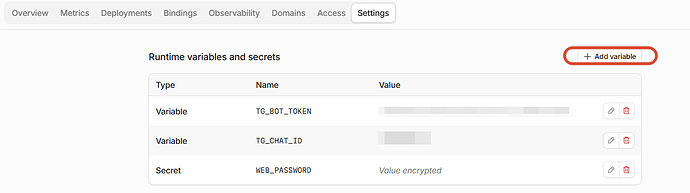
绑定环境变量(安全密码 & TG):
进入 Variables and Secrets(变量和机密) → 点击 Add 添加三条:
- WEB_PASSWORD:你自定义的 Web 看板访问密码(如 AdminPass123)。
- TG_BOT_TOKEN:你的 Telegram 机器人 Token。
- TG_CHAT_ID:你的 Telegram 个人数字 ID。
点击保存并部署。
4、配置邮件路由规则(Catch-all 全接收)
找到路由规则:Email(电子邮件) → Email Routing(邮件路由) → Routing rules(路由规则)。
找到 Catch-all(兜底规则),点击编辑:
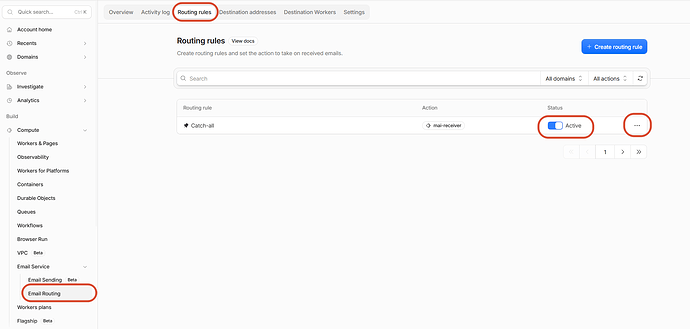
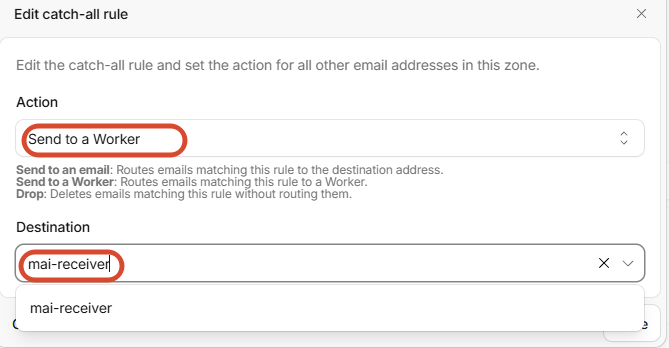
操作(Action):选择 Send to a Worker(发送到 Worker)。
目标 Worker:选中 mail-receiver。
保存并确保该规则右侧的状态开关是已启用(Enabled)。
5、为 Web 看板绑定自定义域名
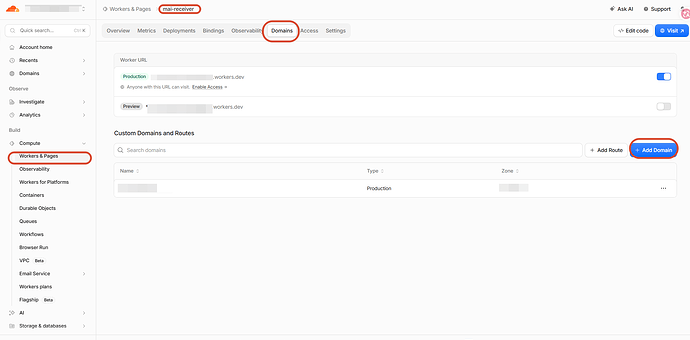
回到 Worker mail-receiver 的 Domains页面。
点击 Add → 选择 Custom Domain(自定义域)。
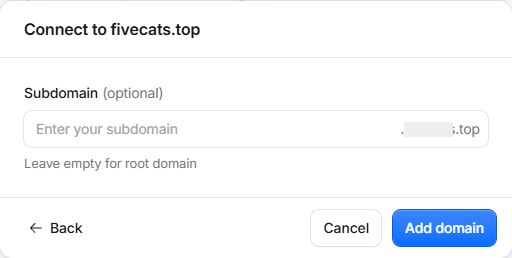
输入:mail.yourdomain.com,点击确定。
四、 核心功能使用指南
- 外部邮箱多渠道分流转发
现在任何 @yourdomain.com 结尾的邮箱都能收信,并自动在面板和 TG 标记渠道。
- 网页端查看 Python HTML 自动化日报
打开浏览器访问:https://mail.yourdomain.com。
输入 WEB_PASSWORD 登录。
左侧点击邮件,右侧基于独立沙箱视窗渲染,Python 生成的表格、图表、颜色样式 1:1 呈现。
结语
本贴仅为本人纪念留贴,目的在于探索邮件转发集成的方法和CF的玩法,并非严格的教程贴,如果有什么细节没写到位可以自行和ai对话询问。
目前仅能实现邮件转发集成+TG机器人提醒+看板查看,无法回信和管理邮箱,仅作为多邮箱收件情况下的一种轻量部署解决方案。
主楼 - Bosch2026-09-17
- Zoooooone2026-09-17
本意是为了极致轻量化哈哈哈,而且也没有发件的需求,所以部署到cf是我能想到最简单的方法了,只是硬性要求有一个域名 ^-^