- Mr.Q2026-05-24
求助求助 ^-^
各位佬好,我是Oracle Cloud新手,目前遇到SSH连接问题,尝试了各种方法都没解决,求帮助~~~
基本情况
- 账号:Always Free(免费套餐)
- 地区:日本大阪(ap-osaka-1)
- 系统:Linux Ubuntu 22.04
- 机型:VM.Standard.E2.1.Micro(1 OCPU / 1GB)
- 用户名:ubuntu
- 密钥类型:创建实例生成的密钥,把公私钥下载到本地
问题描述
简短一点就是,创建实例的时候上传公钥,然后本地用ssh 使用私钥连不上服务器
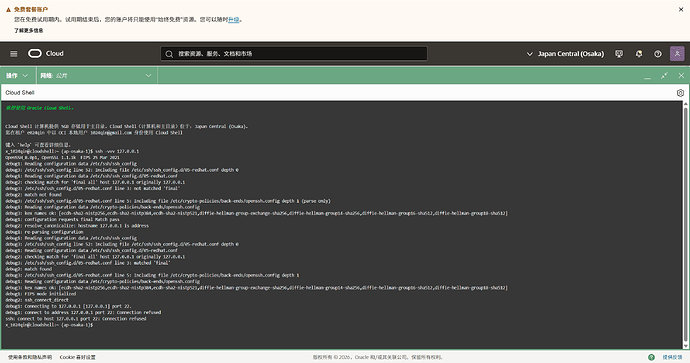
SSH连接时TCP能建立,但SSH握手阶段被服务器关闭:```
debug1: Connection established.
debug1: Local version string SSH-2.0-OpenSSH_for_Windows_9.5
kex_exchange_identification: Connection closed by remote host
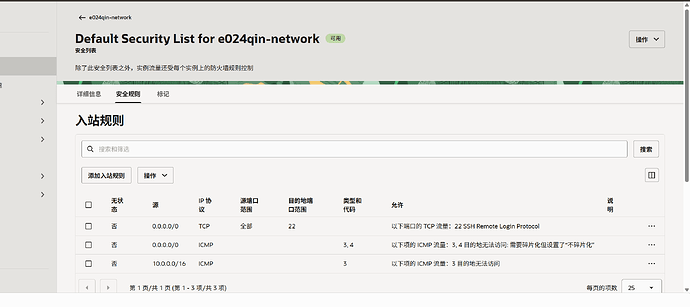
Connection closed by ip port 221.**本地网络问题排查** — 开代理能建立TCP连接但SSH握手失败,关代理超时(国内网络直连不通,正常) 2.**Cloud Shell内SSH连接** — 同样卡住无响应,说明不是本地代理问题 3.**重启实例(SOFTRESET)** — 怀疑是ssh 没有启动 尝试重启后问题还是连不上 4.**控制台登录** — Ubuntu系统时密码为空登录不上;Oracle Linux系统(又创建了一个实例)opc用户也要求密码,无法登录 5.**安全列表(Security List)** — 端口22入站规则已正确配置(0.0.0.0/0 → TCP → 22) 6.**密钥验证** — `ssh-keygen -y -f` 输出公钥与实例上粘贴的公钥一致,密钥匹配没问题 7.**文件权限** — 已用icacls修复私钥权限,排除权限问题 8.**之前Ubuntu系统** — 也是同样的问题,怀疑是ufw防火墙问题,但控制台进不去关不了ufw 请求帮助 ssh-key-2026-05-23.key.zip (2.0 KB) 有经验的佬能帮忙分析一下可能的原因吗?或者有没有什么方法能从外部强制修复实例内的SSH服务?本小菜鸡已经懵了,好不容易翻过一座大山,结果迎来的还是一座大山 公钥私钥 公网ip :[[email protected]](https://feedbbs.com/cdn-cgi/l/email-protection) ^-^【2026-05-24 16:46 更新:破案了!】 各位佬,问题已经**彻底解决了**!两台免费小鸡(Ubuntu 和 Oracle Linux)目前全部丝滑连入! 最后发现,是初始化的默认网络路由没有放开Internet 网关的流量(就那个默认路由表) 我重新创建了一个路由表 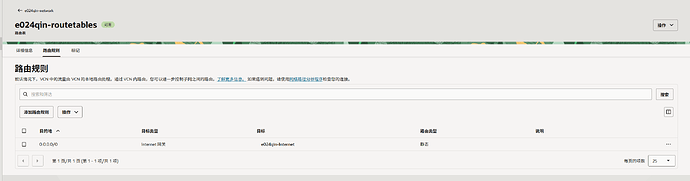 然后在子网中更换路由表 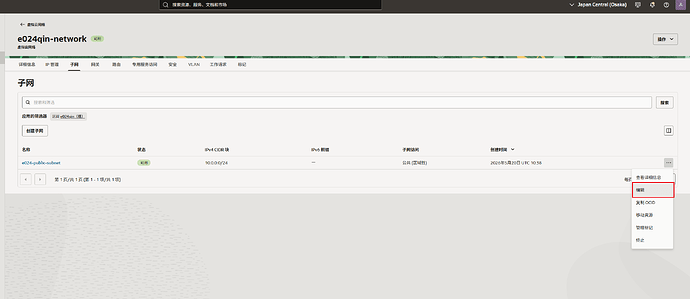 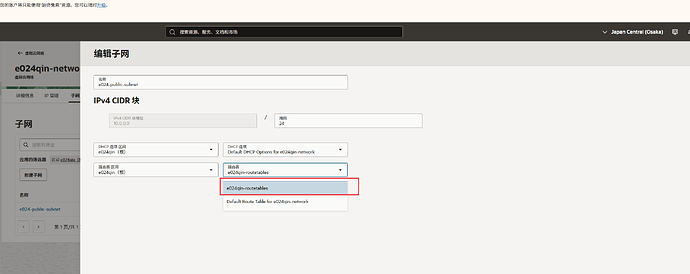 然后呢就是 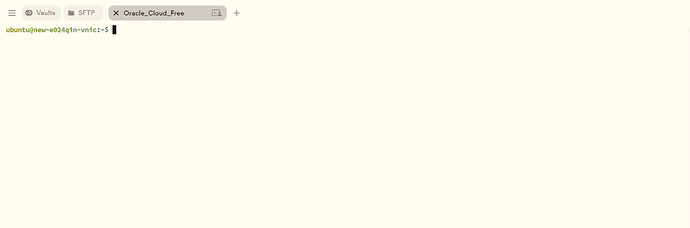 `完美通关甲骨文免费小鸡!` ^-^主楼 - twinkle2026-05-24
重新安装系统ssh服务应该可以修复,如果还是连不上应该就不是ssh服务的问题了。
- Mr.Q2026-05-24
重新安装系统好像也试过,甚至创建了4个实例,都连不上 ^-^
- Eric122026-05-24
- twinkle2026-05-24
22端口看样子已经连上了,应该不是ufw的问题。看一下密钥权限和连接命令是什么
- Mr.Q2026-05-24
OpenSSH_for_Windows_9.5p2, LibreSSL 3.8.2
debug1: Executing proxy command: exec ncat --proxy 127.0.0.1:7890 --proxy-type socks5 140.83.83.255 22
debug1: identity file .\ssh-key-2026-05-23.key type 0
debug1: Local version string SSH-2.0-OpenSSH_for_Windows_9.5
kex_exchange_identification: Connection closed by remote host
Connection closed by UNKNOWN port 65535
这个是ssh -vvv 的日志,systemd 相关的 cloud shell进不去看不到 ^-^
- twinkle2026-05-24
通过代理连了,把代理关一下试试呢?
- Xiaomo2026-05-24
是不是你IP被墙了
OpenSSH_for_Windows_9.5p2, LibreSSL 3.8.2
debug1: Executing proxy command: exec ncat --proxy 127.0.0.1:7890 --proxy-type socks5 140.83.83.255 22
debug1: identity file .\ssh-key-2026-05-23.key type 0
debug1: Local version string SSH-2.0-OpenSSH_for_Windows_9.5
kex_exchange_identification: Connection closed by remote host
Connection closed by UNKNOWN port 65535你用本地的代理区访问的,代理掐断的
- Mr.Q2026-05-24
连接命令```
ssh -o ProxyCommand="ncat --proxy 127.0.0.1:7890 --proxy-type socks5 %h %p" -i .\ssh-key-2026-05-23.key [email protected]
``私钥权限``
icacls .\ssh-key-2026-05-23.key
.\ssh-key-2026-05-23.key MR_Q\38283:(R) - Xiaomo2026-05-24
你不用代理试试.看能不能连上 ^-^.
- xinjueqio2026-05-24
有没有可能,你工具问题,试试更新最新的,ssh 我之前用旧版也不行,升级了就正常了试试新版,xshell试试
- Eric122026-05-24
- Ralph2026-05-24
官方重装系统呢?进不去系统,就用官方的重装系统,添加一个新的key。或者shell救援
- Mr.Q2026-05-24
不用代理的话直接就是连接超时
PS D:\Users\38283\Desktop\oracleCloud\newTemp> ssh -vvv -i ./ssh-key-2026-05-23.key [[email protected]](https://feedbbs.com/cdn-cgi/l/email-protection)
OpenSSH_for_Windows_9.5p2, LibreSSL 3.8.2
debug3: Failed to open file:C:/Users/38283/.ssh/config error:2
debug3: Failed to open file:C:/ProgramData/ssh/ssh_config error:2
debug2: resolve_canonicalize: hostname 161.33.3.16 is address
debug3: expanded UserKnownHostsFile ‘~/.ssh/known_hosts’ → ‘C:\Users\38283/.ssh/known_hosts’
debug3: expanded UserKnownHostsFile ‘~/.ssh/known_hosts2’ → ‘C:\Users\38283/.ssh/known_hosts2’
debug3: ssh_connect_direct: entering
debug1: Connecting to 161.33.3.16 [161.33.3.16] port 22.
debug3: finish_connect - ERROR: async io completed with error: 10060, io:000002CB7BAD9380
debug1: connect to address 161.33.3.16 port 22: Connection timed out
ssh: connect to host 161.33.3.16 port 22: Connection timed out
PS D:\Users\38283\Desktop\oracleCloud\newTemp>
- Xiaomo2026-05-24
你安全组的出入站规则没问题吧. ^-^
- Mr.Q2026-05-24
- Mr.Q2026-05-24
- twinkle2026-05-24
方便的话私发一下密钥,我帮你试试。
- voidm2026-05-24
账户密码发出来 , 大家试试 ^-^
- Eric122026-05-24