- catnap2026-08-13
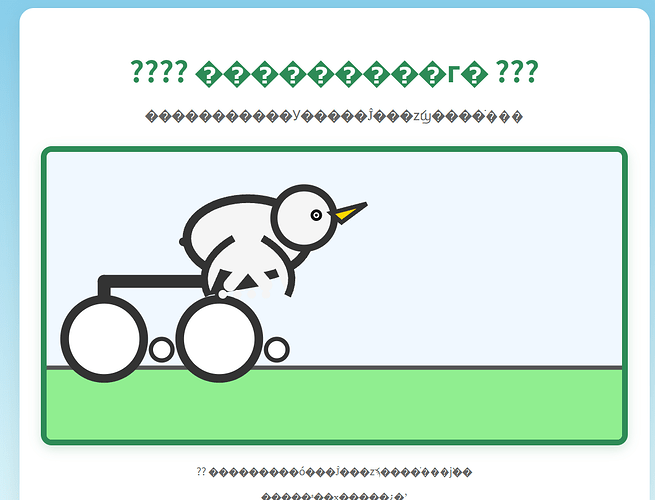
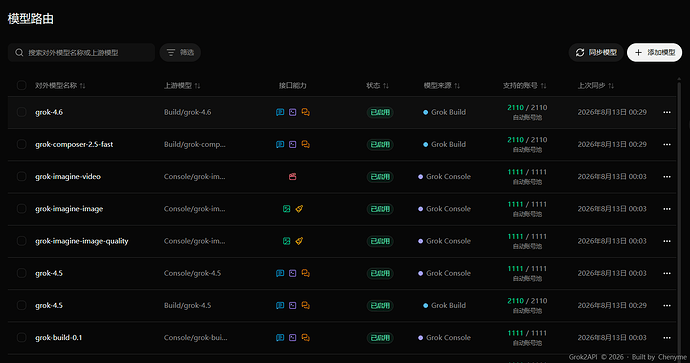
还以为老马会大发慈悲让我试试的,结果不出所料风控号还是降智了,也不知道给我路由到哪个模型了
甚至还是静态图,根本没动起来
总结
`
鹈鹕骑自行车动画
@import url('https://fonts.googleapis.com/css2?family=Noto+Sans+SC:wght@400;700&display=swap');```
body {
margin: 0;
padding: 20px;
background: linear-gradient(#87CEEB, #E0F7FA);
font-family: 'Noto Sans SC', sans-serif;
display: flex;
justify-content: center;
align-items: center;
min-height: 100vh;
overflow: hidden;
}.container {
text-align: center;
background: white;
padding: 30px;
border-radius: 20px;
box-shadow: 0 10px 30px rgba(0,0,0,0.1);
}h1 {
color: #2E8B57;
margin-bottom: 10px;
font-size: 2.5rem;
}.subtitle {
color: #666;
margin-bottom: 30px;
font-size: 1.2rem;
}svg {
background: #F0F8FF;
border: 8px solid #2E8B57;
border-radius: 15px;
box-shadow: 0 5px 15px rgba(46,139,87,0.2);
transition: transform 0.3s ease;
}svg:hover {
transform: scale(1.05);
}.info {
margin-top: 20px;
color: #666;
font-size: 0.9rem;
}
</style>
```???? 鹈鹕骑自行车 ???鹈鹕正在骑行,翅膀拍打,喙张合,车轮滚动```
<!-- 草地背景 -->
<rect x="0" y="300" width="800" height="100" fill="#90EE90"/>
<rect x="0" y="300" width="800" height="100" fill="url(#grass-pattern)"/><!-- 地面 -->
<line x1="0" y1="300" x2="800" y2="300" stroke="#555" stroke-width="6" stroke-linecap="round"/><!-- 自行车 -->
<g id="bike" transform="translate(80, 260)"><!-- 车架 -->
<line x1="0" y1="0" x2="0" y2="-80" stroke="#333" stroke-width="18" stroke-linecap="round" />
<line x1="0" y1="-80" x2="160" y2="-80" stroke="#333" stroke-width="18" stroke-linecap="round" />
<line x1="160" y1="-80" x2="160" y2="-20" stroke="#333" stroke-width="12" stroke-linecap="round" /><!-- 后轮 -->
<circle cx="0" cy="0" r="55" fill="#fff" stroke="#333" stroke-width="12"/>
<!-- 后轮辐条 -->
<g id="rear-spokes">
<line x1="0" y1="0" x2="0" y2="0" stroke="#333" stroke-width="4" transform="rotate(0 0 0)"/>
<line x1="0" y1="0" x2="0" y2="0" stroke="#333" stroke-width="4" transform="rotate(45 0 0)"/>
<line x1="0" y1="0" x2="0" y2="0" stroke="#333" stroke-width="4" transform="rotate(90 0 0)"/>
<line x1="0" y1="0" x2="0" y2="0" stroke="#333" stroke-width="4" transform="rotate(135 0 0)"/>
<line x1="0" y1="0" x2="0" y2="0" stroke="#333" stroke-width="4" transform="rotate(180 0 0)"/>
<line x1="0" y1="0" x2="0" y2="0" stroke="#333" stroke-width="4" transform="rotate(225 0 0)"/>
<line x1="0" y1="0" x2="0" y2="0" stroke="#333" stroke-width="4" transform="rotate(270 0 0)"/>
<line x1="0" y1="0" x2="0" y2="0" stroke="#333" stroke-width="4" transform="rotate(315 0 0)"/>
</g><!-- 后座垫 -->
<rect x="140" y="-85" width="80" height="18" fill="#333" rx="4" transform="rotate(-10 180 -85)"/><!-- 前轮 -->
<circle cx="160" cy="0" r="55" fill="#fff" stroke="#333" stroke-width="12"/>
<!-- 前轮辐条 -->
<g id="front-spokes">
<line x1="160" y1="0" x2="160" y2="0" stroke="#333" stroke-width="4" transform="rotate(0 160 0)"/>
<line x1="160" y1="0" x2="160" y2="0" stroke="#333" stroke-width="4" transform="rotate(45 160 0)"/>
<line x1="160" y1="0" x2="160" y2="0" stroke="#333" stroke-width="4" transform="rotate(90 160 0)"/>
<line x1="160" y1="0" x2="160" y2="0" stroke="#333" stroke-width="4" transform="rotate(135 160 0)"/>
<line x1="160" y1="0" x2="160" y2="0" stroke="#333" stroke-width="4" transform="rotate(180 160 0)"/>
<line x1="160" y1="0" x2="160" y2="0" stroke="#333" stroke-width="4" transform="rotate(225 160 0)"/>
<line x1="160" y1="0" x2="160" y2="0" stroke="#333" stroke-width="4" transform="rotate(270 160 0)"/>
<line x1="160" y1="0" x2="160" y2="0" stroke="#333" stroke-width="4" transform="rotate(315 160 0)"/>
</g><!-- 车把 -->
<line x1="160" y1="-80" x2="160" y2="-120" stroke="#333" stroke-width="14" stroke-linecap="round"/>
<line x1="160" y1="-120" x2="110" y2="-135" stroke="#333" stroke-width="12" stroke-linecap="round"/>
<line x1="160" y1="-120" x2="210" y2="-135" stroke="#333" stroke-width="12" stroke-linecap="round"/><!-- 链条 -->
<line x1="0" y1="0" x2="0" y2="0" stroke="#333" stroke-width="6" stroke-dasharray="8 6" id="chain"/><!-- 踏板 -->
<circle cx="80" cy="15" r="18" fill="#333"/>
<circle cx="80" cy="15" r="12" fill="#fff"/>
<circle cx="240" cy="15" r="18" fill="#333"/>
<circle cx="240" cy="15" r="12" fill="#fff"/>
</g><!-- 鹈鹕 -->
<g id="pelican" transform="translate(280, 120)"><!-- 身体 -->
<ellipse cx="0" cy="0" rx="85" ry="55" fill="#F5F5F5" stroke="#333" stroke-width="12"/><!-- 头部 -->
<circle cx="78" cy="-28" r="42" fill="#F5F5F5" stroke="#333" stroke-width="10"/><!-- 眼睛 -->
<circle cx="95" cy="-32" r="8" fill="#111"/>
<circle cx="95" cy="-32" r="4" fill="#fff"/>
<circle cx="95" cy="-32" r="2" fill="#111"/><!-- 喙 -->
<polygon points="115,-35 165,-48 130,-22" fill="#FFD700" stroke="#333" stroke-width="6"/>
<polygon points="130,-22 165,-48 130,-22" fill="#FFAA00"/><!-- 翅膀(拍打用) -->
<!-- 左翅膀 -->
<path id="wing-left" d="M-20,0 C-55,20 -70,50 -55,80" fill="#F5F5F5" stroke="#333" stroke-width="10" transform="rotate(0 0 0)"/>
<!-- 右翅膀 -->
<path id="wing-right" d="M20,0 C55,20 70,50 55,80" fill="#F5F5F5" stroke="#333" stroke-width="10" transform="rotate(0 0 0)"/><!-- 腿和脚 -->
<line x1="0" y1="35" x2="-25" y2="65" stroke="#F5F5F5" stroke-width="18" stroke-linecap="round"/>
<line x1="0" y1="35" x2="25" y2="65" stroke="#F5F5F5" stroke-width="18" stroke-linecap="round"/><!-- 脚趾 -->
<circle cx="-35" cy="78" r="6" fill="#F5F5F5"/>
<circle cx="-15" cy="78" r="6" fill="#F5F5F5"/>
<circle cx="5" cy="78" r="6" fill="#F5F5F5"/>
<circle cx="25" cy="78" r="6" fill="#F5F5F5"/>
</g></svg>
<div class="info">
<p>?? 鹈鹕正在用翅膀拍打、喙张合、车轮滚动前进</p>
<p>你可以刷新页面重新开始</p>
</div>
</div><script>
// 动画控制
const bike = document.getElementById('bike');
const pelican = document.getElementById('pelican');
const chain = document.getElementById('chain');
const wingLeft = document.getElementById('wing-left');
const wingRight = document.getElementById('wing-right');
const rearSpokes = document.getElementById('rear-spokes');
const frontSpokes = document.getElementById('front-spokes');let position = 0;
const speed = 1.8;// 初始位置
bike.setAttribute('transform', 'translate(80, 260)');
pelican.setAttribute('transform', 'translate(280, 120)');// 动画函数
function animate() {
position += speed;// 自行车前进
const newX = 80 + position;
bike.setAttribute('transform', ranslate(, 260));// 鹈鹕头部上下摇晃
const bob = Math.sin(position 0.08) 8;
pelican.setAttribute('transform', ranslate(, ));// 喙张合
const beakScale = 1 + Math.sin(position 0.12) 0.12;
const beak = pelican.querySelector('polygon:last-child');
if (beak) {
beak.setAttribute('transform', scale() translate(115, -35));
}// 翅膀拍打
const flap = Math.sin(position 0.18) 25;
wingLeft.setAttribute('transform',
```otate( 0 0));wingRight.setAttribute(‘transform’,
otate( 0 0));```
// 车轮旋转
const wheelRotate = position * 8;
rearSpokes.querySelectorAll('line').forEach((spoke, i) => {
spoke.setAttribute('transform',
```otate( 0 0));});
frontSpokes.querySelectorAll(‘line’).forEach((spoke, i) => {
spoke.setAttribute(‘transform’,
otate( 160 0));
});```
// 链条摆动
chain.setAttribute('x2', );
chain.setAttribute('y2', ${Math.sin(position 0.1) 15});// 踏板旋转
const pedalRotate = position * 6;
const pedals = pelican.querySelectorAll('circle:nth-child(3)');
pedals.forEach((pedal, i) => {
pedal.setAttribute('transform',
```otate( 80 15));});```
requestAnimationFrame(animate);
}// 开始动画
animate();// 每5秒改变一下背景颜色,增加趣味性
setInterval(() => {
const svg = document.getElementById('animation');
const colors = ['#F0F8FF', '#E0F7FA', '#B0E0E6', '#87CEEB'];
svg.style.background = colors[Math.floor(Math.random() * colors.length)];
}, 5000);
</script>
````主楼 - sunking2026-08-13
注册个新号试试看,新号还是可以玩玩的
- catnap2026-08-13
发出来才发现,降智到连html格式都写错了,怪不得动不起来
- langren2026-08-13
我感觉ai本身就是不稳定因素,好多测试都不一样。
- balangxian2026-08-13
grok4.6 出来了,免费的新号支持吗?
- catnap2026-08-13
- hank2026-08-13
佬,注册机地址方便发一下呗,我这注册出来的拉不到4.6